
Start with retrieval, not collection
A prompt only earns a place in your library when you expect to reuse its structure. Saving every interesting exchange creates a pile, not a system. Keep complete conversations in a chat archive; keep durable instructions in the prompt library.
Before saving a prompt, ask: What future situation would make me search for this? Use that answer as the basis for its title and folder.
Save the repeatable method as a prompt. Save the evidence, decisions, and output as a conversation or snippet.
Give prompts names you can scan
Names such as “Good prompt,” “Writing,” or “Final version” become meaningless after a few weeks. Prefer a short verb, an object, and—when useful—a constraint.
- Summarize a customer interview into themes
- Review a pull request for regression risk
- Rewrite landing-page copy for a technical buyer
- Turn meeting notes into assigned actions
This format mirrors how people search: by the job they want done. Put model names in the title only when the prompt truly depends on that model.
Use a shallow folder structure
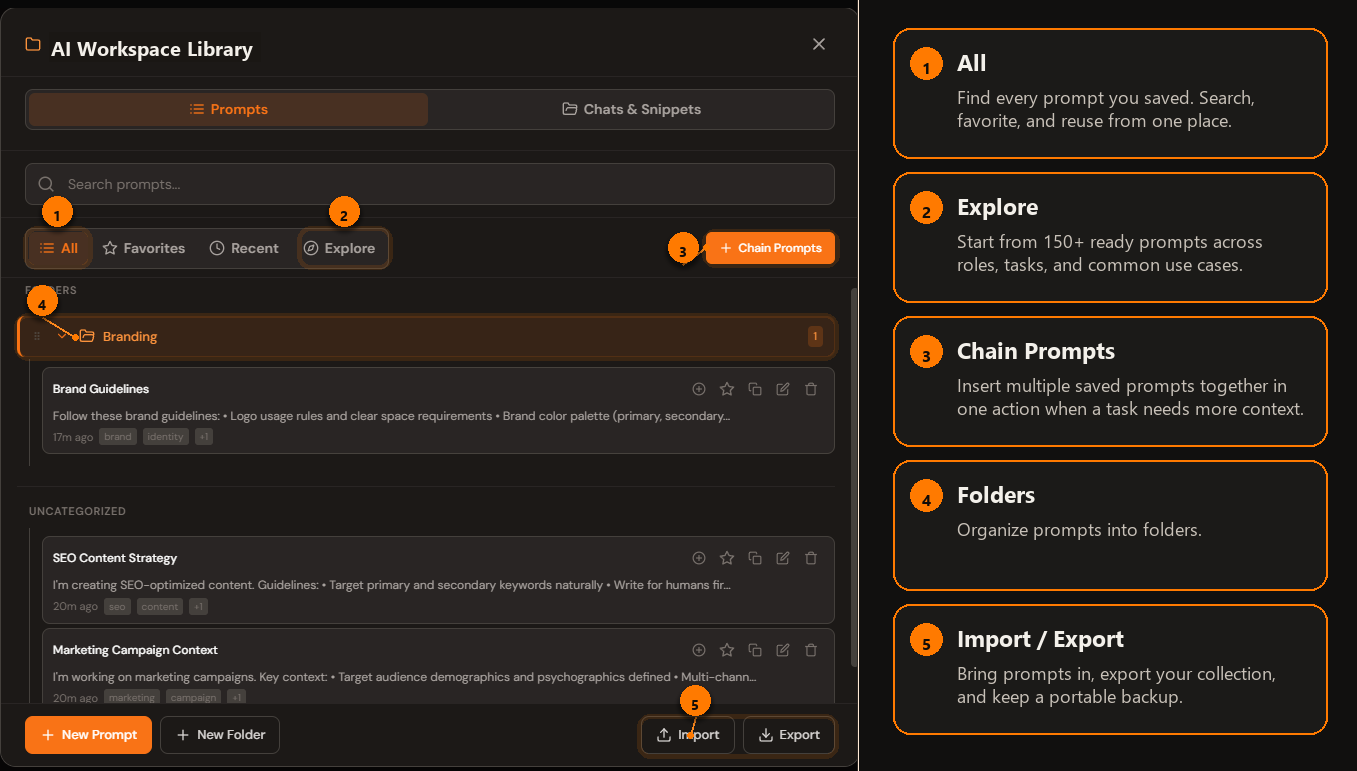
Start with a handful of stable areas such as Writing, Research, Product, Engineering, and Operations. Add a project folder only when a project generates enough reusable material to justify one.
Avoid nesting by every possible dimension. A prompt can belong to one primary folder and carry useful terms in its title or description. Deep hierarchies make filing feel precise but slow retrieval.
Saved conversations work better in their own folders, organized by project. See how to organize ChatGPT chats into folders.
Turn changing details into variables
If the structure is stable but the subject changes, replace the changing pieces with clearly named variables. A useful variable describes the expected input, not merely its position.
- Use {audience}, not {thing1}.
- Use {source_text}, not {content}, when the distinction matters.
- Include a short example when the input format is easy to misunderstand.
Keep the variable count low. If a template needs a long questionnaire before it can run, split it into a small chain or create separate prompts for distinct jobs.
Store the quality bar with the instruction
Reusable prompts work better when they include the standard the answer must meet. Add the intended audience, output format, constraints, and acceptance checks. When a factual answer needs sources, say what kind of sources count.
Do not bury the task beneath a long persona. A compact structure is easier to maintain: context, task, constraints, output, and quality check.
Review the library when you use it
You do not need a large cleanup project. When a prompt disappoints, improve it before saving the next version. When two prompts do the same job, keep the stronger one. When a prompt has not been useful for months, archive or delete it.
- Run the prompt on a realistic input.
- Note where the answer required manual repair.
- Add the missing constraint or example.
- Rename the prompt if its actual purpose changed.
- Keep one current version as the default.
Keep the prompt where you use it
AI Workspace lets you save, organize, and insert reusable prompts directly across supported AI sites.
Add AI Workspace to Chrome