
Make the task portable
The most reusable part of a prompt is usually not a special phrase. It is a clear specification of the task: the goal, relevant context, constraints, output, and quality bar.
Avoid instructions that refer to buttons, modes, or features unless they are necessary. “Use the artifact panel” is platform-specific; “Return a self-contained HTML file” describes the deliverable and can travel.
Separate the core from adapters
Keep one core template for the durable job. Add a short platform-specific note only when a model needs different tool instructions, file handling, citation behavior, or output constraints.
- Core: audience, task, inputs, constraints, output schema, acceptance checks.
- Adapter: platform tools, available context window, browsing or citation requirements, attachment instructions.
- Run-specific context: the actual source material, deadline, project, and audience.
This is easier to maintain than four copies that slowly drift apart.
Use variables for changing context
Replace project-specific facts with named variables such as {audience}, {source_material}, and {output_format}. Keep stable quality instructions in the template itself.
Variables also expose missing information. If you cannot supply the audience or evidence, the prompt can ask a clarifying question instead of inventing an answer.
Test outcomes, not identical wording
Different models will not return identical prose, and that should not be the goal. Test whether each answer satisfies the same acceptance checks.
- Use the same realistic input.
- Check factual grounding and unsupported assumptions.
- Compare structure, completeness, and actionability.
- Record model-specific failures that repeat.
- Add a small adapter only when it consistently improves the result.
Keep one library close to every composer
Copying prompts into separate notes or platform histories creates multiple sources of truth. A shared prompt library makes the current version available wherever the task begins.
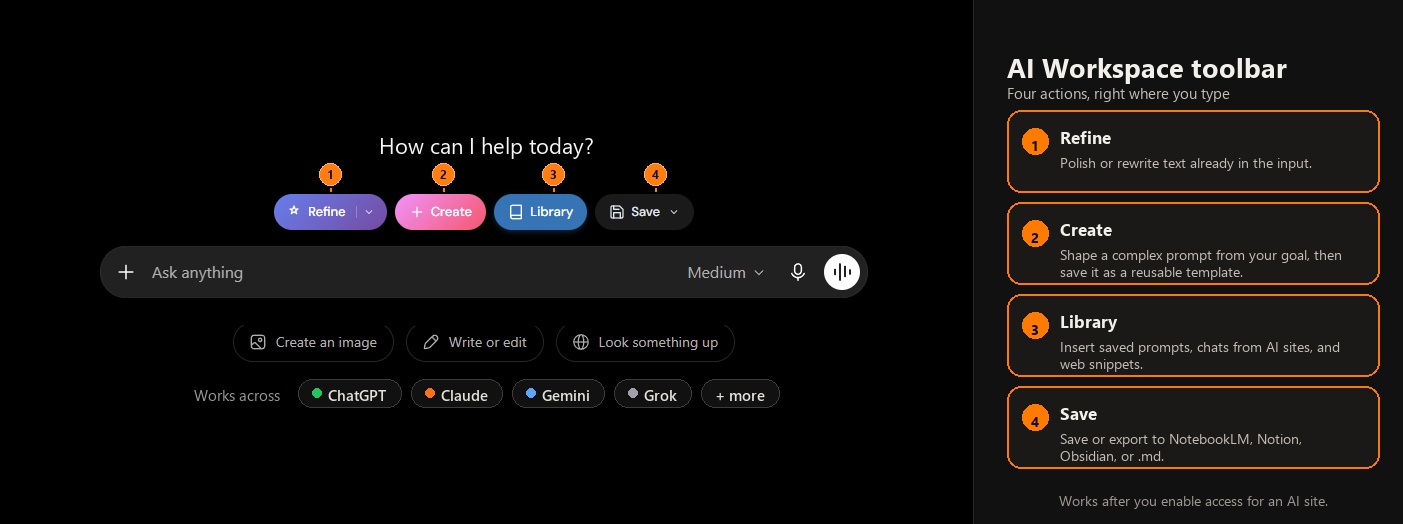
Use a title based on the job, then mention a platform only if the template has a genuine dependency. See how to organize the library for a maintainable folder and naming system.
Review prompts when models or workflows change
Model behavior and product capabilities evolve. Avoid hard-coding assumptions about a platform when a plain task specification would work. When a prompt starts underperforming, retest the core before creating another platform copy.
Keep notes about verified limitations concise and dated. Delete adapters that are no longer needed so historical workarounds do not become permanent complexity.
Bring one prompt library to your AI tools
AI Workspace helps you reuse the same organized prompt system across supported sites.
Add AI Workspace to Chrome