
Decide what the Notion page is for
Exporting is most useful when the conversation produced something durable: a decision, research synthesis, plan, specification, reusable prompt, or set of actions. If the chat was exploratory and led nowhere, keeping it in a local archive may be enough.
Choose the destination before exporting. A research database needs sources and topic fields; a decision log needs the decision, rationale, owner, and date; a project page needs actions and dependencies.
Prepare the conversation
Give the saved chat a descriptive title and remove content that should not enter a shared workspace. Check for personal information, secrets, customer data, internal URLs, and unsupported factual claims.
A concise summary helps people scan. The original transcript preserves how the result was reached. Store both when the reasoning path is important.
Use a repeatable page structure
A useful exported page usually needs less conversation and more orientation. Start with:
- Purpose: why the AI conversation happened.
- Outcome: the answer, decision, or artifact worth keeping.
- Key context: assumptions and constraints that shaped the result.
- Sources: links or documents that support factual claims.
- Next actions: owner and due date where applicable.
- Transcript: the preserved exchange, clearly separated below.
Export from the place where you worked
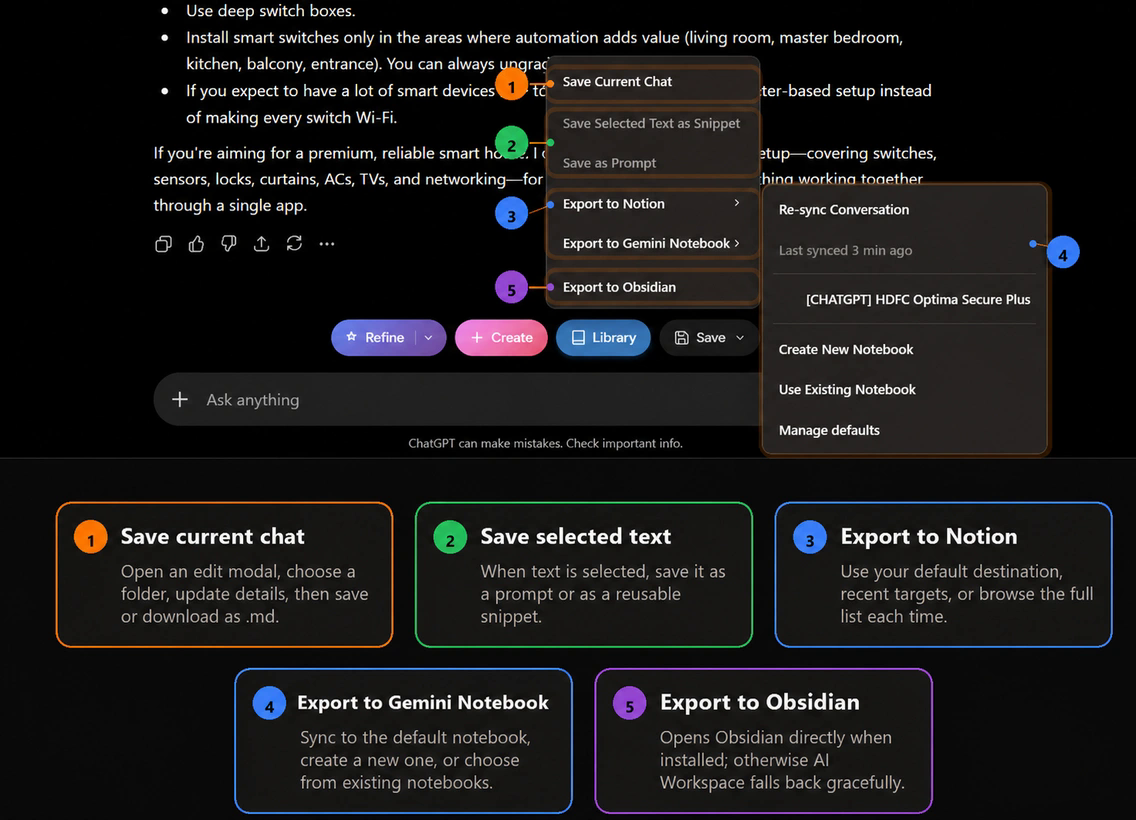
AI Workspace can save a supported AI conversation and send saved content to Notion. The exact available action depends on the current site and your plan. Review the destination and page title before completing the export.
Run a quality check after export
- Open the new Notion page and confirm the title and destination.
- Check that headings, lists, code, and links remained readable.
- Add database properties that automation could not infer safely.
- Verify important sources instead of treating an AI citation as proof.
- Assign owners to actions and remove any leftover conversational filler.
If portability matters more than a collaborative database, consider exporting AI chats to Markdown or saving AI chats to Obsidian. To ask questions across several conversations, see exporting chats to NotebookLM.
Make exports part of a knowledge workflow
Do not export every chat. Create a clear threshold: export when a conversation changes a decision, produces a reusable artifact, or supplies evidence someone will need later. This prevents Notion from becoming a second unfiltered chat history.
When the underlying saved content changes materially, update or re-export the destination according to your team’s ownership rules. A stale page with a polished title is harder to detect than a missing page.
Move useful AI work into Notion
AI Workspace keeps saving and export actions available in supported AI conversations.
Add AI Workspace to Chrome