
Why Markdown works well for AI chats
Markdown is plain text with lightweight formatting for headings, lists, links, quotes, and code. That makes it easy to search, diff, back up, and move. You can open the archive without relying on the original AI platform or a proprietary database.
It is especially useful for project records, research notes, coding sessions, reusable examples, and long-lived personal knowledge bases.
Choose what deserves an export
Export conversations that contain durable context or an artifact you may reuse. A routine question whose answer is easy to reproduce usually does not need a permanent file.
- Decisions and their rationale
- Research synthesis with verified sources
- Working code and debugging history
- Specifications, plans, and checklists
- Examples that improve a reusable prompt
Prepare a clean, descriptive record
Give the conversation a title that will still make sense outside the AI site. Remove secrets and personal data, and check whether linked sources will remain accessible to the future reader.
If your archive uses front matter, keep it small and consistent. Useful fields include the original platform, source URL, saved date, project, and tags. Do not add metadata you will never maintain.
Use a stable form such as 2026-09-02-customer-research-themes.md when chronology matters, or project-topic.md when the note will be updated over time.
Preserve speaker and code structure
A readable transcript distinguishes the user and assistant consistently. Headings work well for long exchanges; bold labels work for shorter ones. Keep fenced code blocks intact and include the language when it is known.
Images and temporary UI artifacts need special attention. A remote image link may disappear; a written description or locally managed attachment is more durable.
Export, then inspect the file
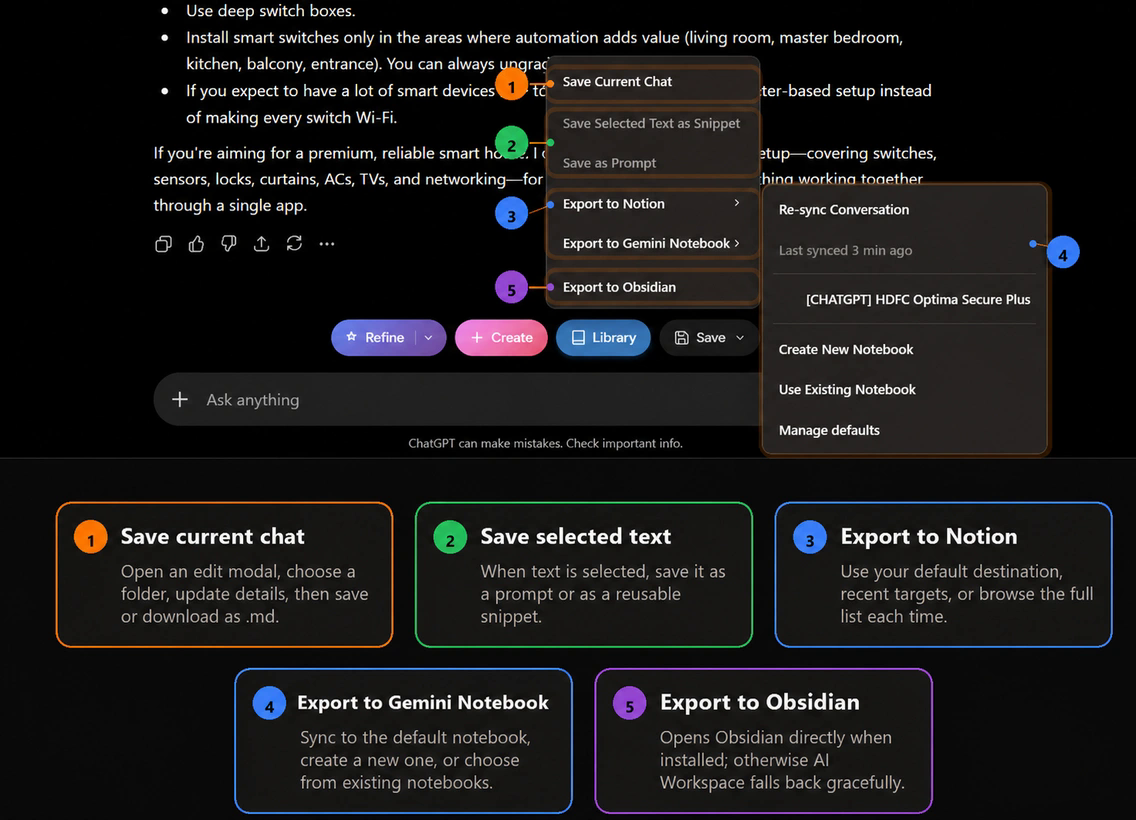
AI Workspace supports Markdown exports for saved work. After exporting, open the file in the editor or knowledge tool you actually use and check headings, nested lists, tables, code fences, links, and special characters.
Keep the archive understandable
- Store related files under a stable project or topic folder.
- Add a short summary above long transcripts.
- Link the note to the decision or artifact it influenced.
- Use version control or backups for material that matters.
- Archive or remove duplicate exports when a canonical note exists.
If your Markdown lives in Obsidian, see how to save AI chats to Obsidian. For a team-oriented database workflow, see exporting AI conversations to Notion. Backing up before you leave a tool? Read how to back up Claude conversations or how to save Gemini chats.
Keep a portable record of useful chats
AI Workspace helps you save AI conversations and export the ones worth keeping.
Add AI Workspace to Chrome